


Preface
Understanding key-value stores begins with the fundamentals of hash maps. From there, it's recommended to explore consistent hashing and caching to see how these systems scale.
If you are not familiar with these concepts, check out these "Easy" articles I previously wrote.
This is part of my series on learning how to pass system design interviews.
Design a Key-value Store
As you should have learned by now, a key value store behaves much like a dictionary or hash map.
You can think of a key-value store as a non-relational database and it can even be referred to as a key-value database.
At its core, a key-value pair works like a labeled storage box:
- Key: A unique label (like a name or ID number) used to find the data later.
- Value: The actual information being stored (like a name, list, or file).
Keys
Think of a key as a unique ID used to find your data. To keep things fast, shorter keys are generally better. They usually come in two flavors:
- Plain Text: Easy to read (e.g.,
user_123) - Hashed: A scrambled string of characters for efficiency (e.g.,
253DDEC4)
Values
The value is the actual data you're saving. While these can be simple strings, complex lists, or objects, the database usually treats them as "opaque". This just stores the data without needing to understand what's inside.
Common Examples of Key-value Stores are Amazon Dynamo, Memcached, and Redis.
A Key-value store resembles a dictionary and hashmap like this:
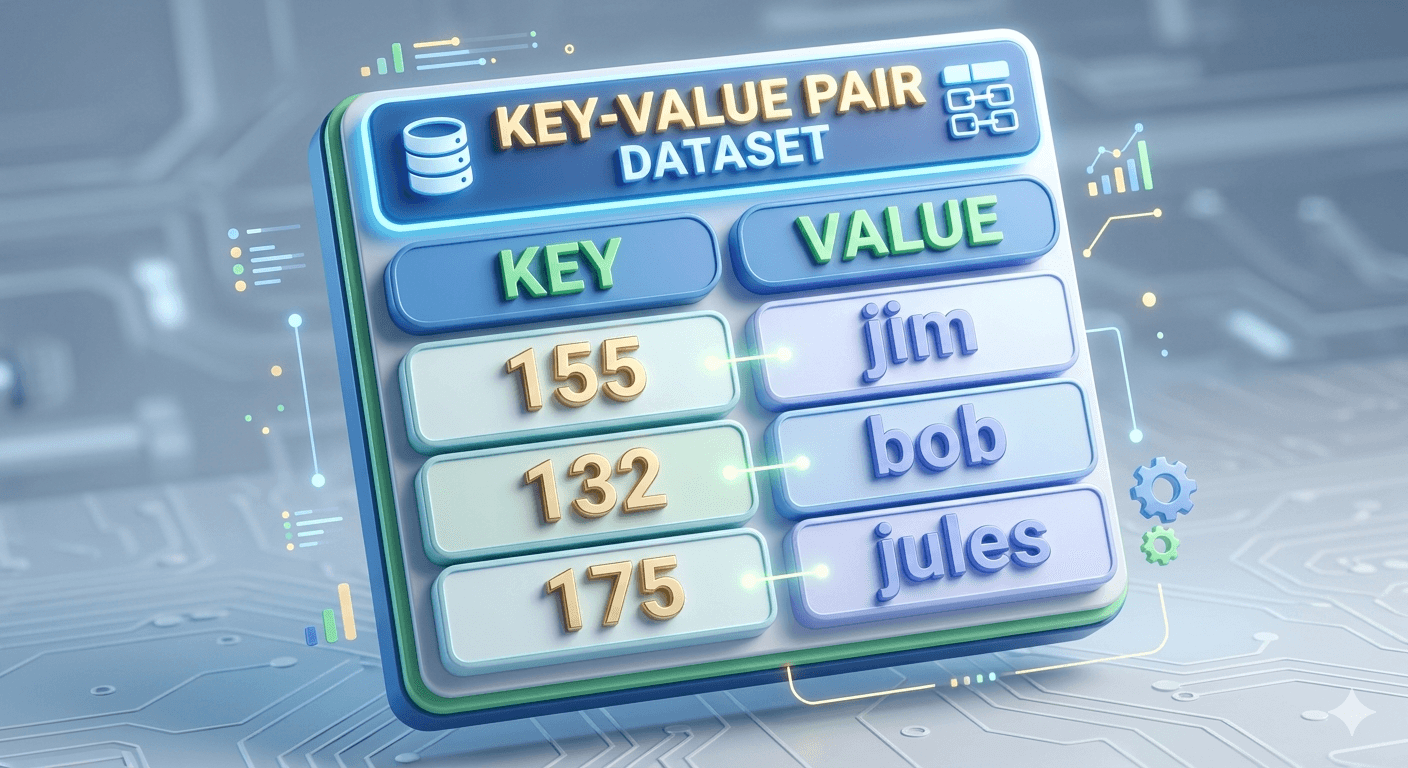
For this blog, we are going to design a key-value store that performs the following operations:
- Insert a value associated with a key using the syntax, put(key,value)
- Use a key to get the value associated with that specific key, get(key)
Different Types of Key-value stores, Understanding their Variations, and Proper Design for Your Problem
There is no one size fits all when we discuss designing a key-value store. Readers should be aware each problem needs a different approach to optimize their design for their specific systems.
Each design creates a specific balance and you should know the tradeoffs of the read, write, and memory usage. Another main tradeoff is determining between consistency or availability.
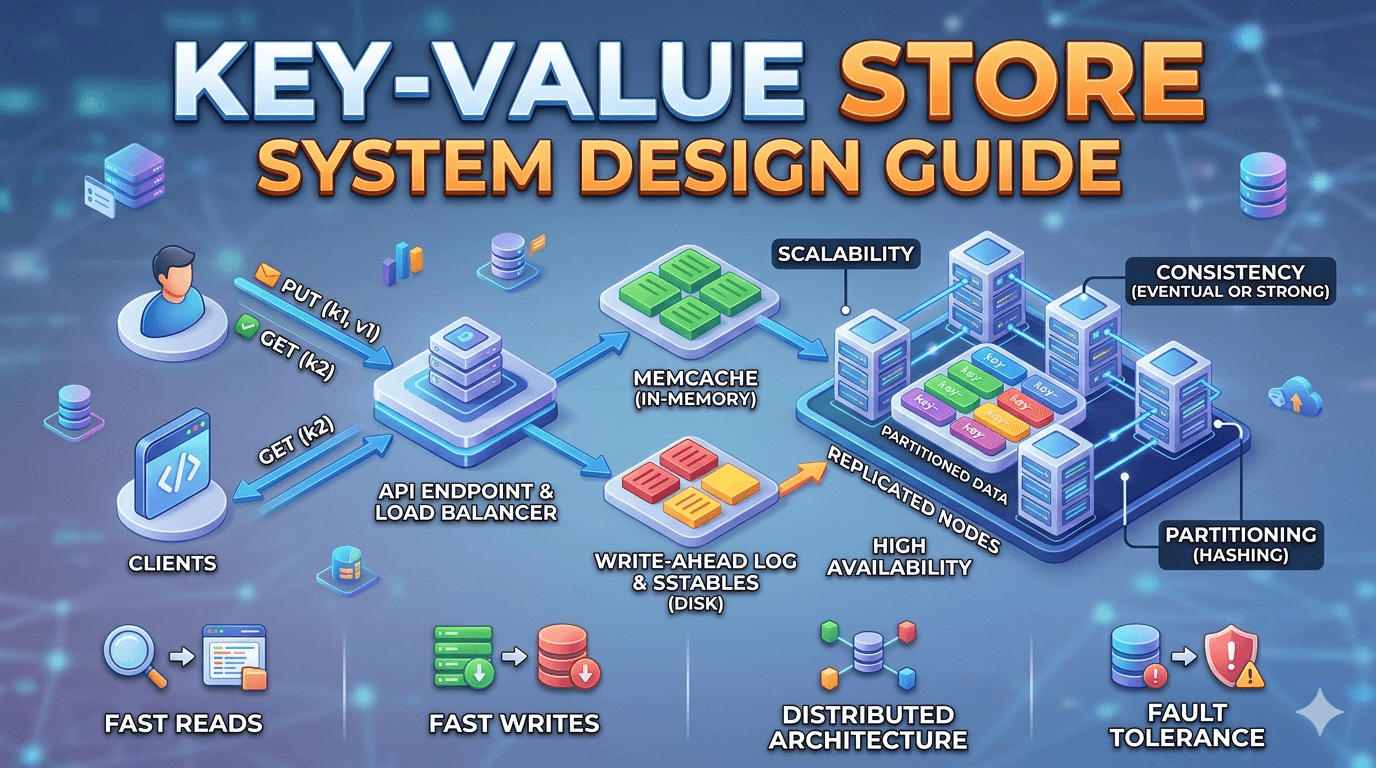
For this guide, we will be designing a key-value store with these characteristics:
- High availability: The system responds quickly, even during failures
- High scalability: The system can be scaled to support large datasets.
- Automatic scaling: The addition and deletion of servers should be automatic based on traffic.
- Ability to store big data.
- Tunable consistency allowing you to control the balance between consistency and availability.
- Low latency, think lightning fast responses.
- The size of a key-value pair is small, less than 10KB, which optimizes store space and reduces costs.
Single server key-value store
Building a single-server key-value store is simple: you can store key-value pairs in a hash table to keep everything in memory for lightning-fast speeds. However, because memory space is limited, you'll eventually run out of room and need to use optimizations to pack more data onto that one machine.
While great in theory, this becomes trivial with larger datasets. Fitting all these key-value pairs in memory may become impossible due to space constraints.
In order to fit more key-value pairs in a single server, we need to create two optimizations.
- The first is to compress the data using data compression algorithms.
- Another optimization is to store frequently used data in memory and the rest on disk.
A single server can reach its capacity very quickly with large scale systems, this is why knowing system design is so important. With larger scale systems, naive solutions would think these two optimizations would be good.
However, this single server solution doesn't work even with the optimizations. In order to proceed with our key-value store design, we will introduce a distributed key-value store for supporting big data.
Distributed key-value store
A distributed key-value store, often called a distributed hash table, spreads data across many servers; designing one requires balancing and learning the CAP theorem: Consistency, Availability, and Partition Tolerance.
CAP theorem
CAP theorem states you can only guarantee two of of three: identical data on all nodes (Consistency), the system always being online (Availability), and the ability to survive a network break (Partition tolerance). Let's go into further detail for a brief overview of CAP definitions.
- Consistency: Everyone sees the same thing at the same time. A more technical version is every read operation is guaranteed to return the most recent write or an error. In a consistent system, all nodes must appear to execute operations in a single, globally agreed-upon order, ensuring a unified state across the entire cluster.
- Availability: You always get an answer, even if it's old info. A more technical version is every request to a non-failing node must result in a non-error response within a reasonable time. However, the system does not guarantee that the response contains the most current data, allowing for "stale" reads to prioritize system uptime.
- Partition Tolerance: The system keeps running even if the servers stop talking to each other. A more technical version is the system maintains operational continuity despite an arbitrary number of messages being dropped or delayed by the network between nodes. This means the system can survive a "split-brain" scenario where groups of nodes remain functional but cannot communicate with each other.
CAP theorem states that a distributed system can deliver only two of three desired characteristics: consistency, availability, and partition tolerance. Only 2 of the 3 should be chosen for your current system design needs and optimizations. Mastering the various CAP tradeoffs is essential for predicting how data consistency or availability constraints will ultimately dictate your system's latency and reliability under stress.
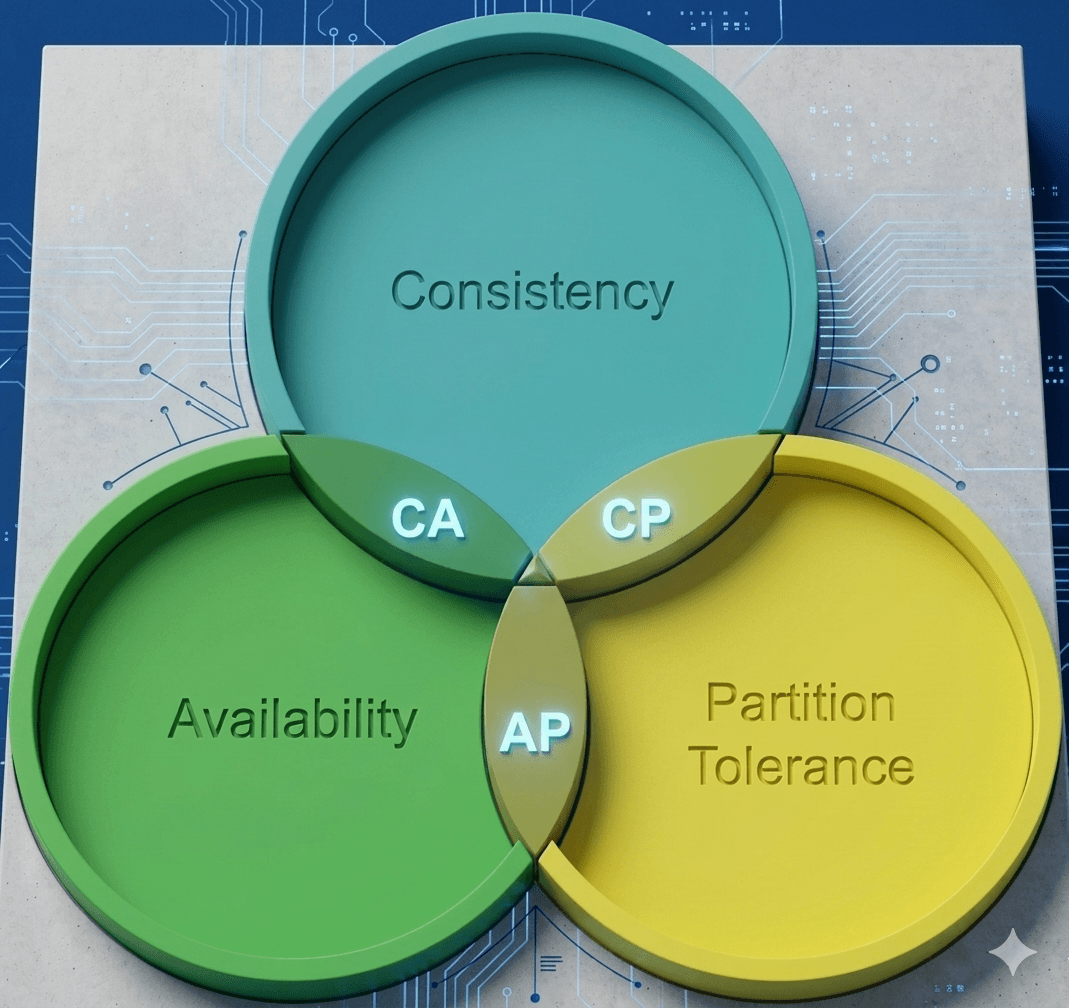
Key-value stores are categorized by which two CAP theorem traits they prioritize:
- CP (Consistency + Partition Tolerance): Prioritizes data accuracy and network reliability, but may go offline (sacrifices Availability) during a split.
- AP (Availability + Partition Tolerance): Prioritizes staying online and network reliability, but data may be temporarily out of sync (sacrifices Consistency).
- CA (Consistency + Availability): These systems prioritize accuracy and uptime but cannot handle network failures. Because network issues are inevitable in the real world, CA systems don't actually exist in distributed computing.
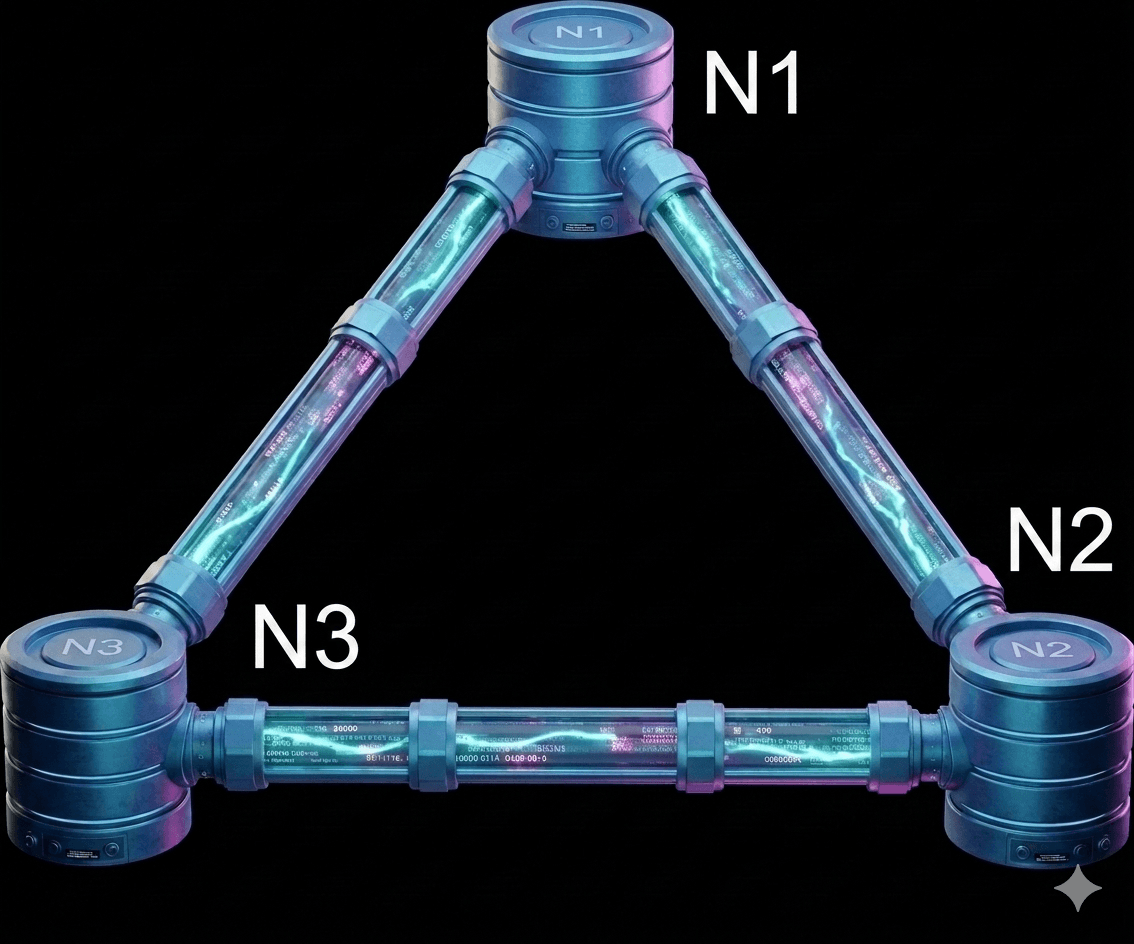
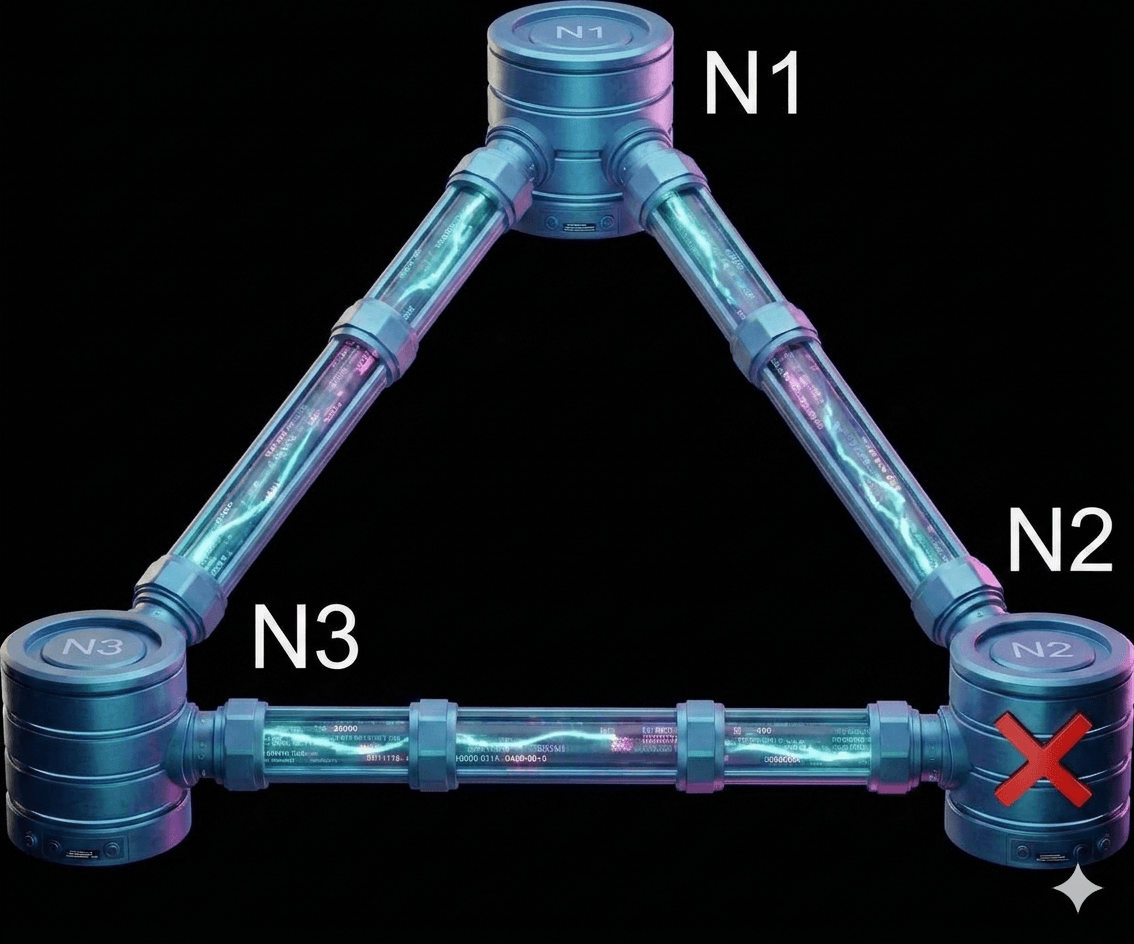
To simplify, let's look at a concrete example. In distributed systems, data is usually copied across multiple servers. For this example, imagine your data is stored on three separate nodes: n1, n2, and n3.
Ideal situation
In an ideal world, the network never fails. When you write data to n1, it is instantly copied to n2 and n3. In this perfect scenario, the system is both consistent (everyone sees the same data) and available (the system is always ready to respond).
Real-world distributed systems
In the real world, network failures (partitions) are unavoidable. When they happen, you have to choose between consistency and availability.
In figure 3, Imagine n2 loses its connection and can no longer talk to n1 and n3:
- If you write new data to n1 or n3: That information can't reach n2, leaving it out of date.
- If data was written to n2 just before it went down: n1 and n3 will now have old ("stale") data because they never received the update.
In a Consistency-focused (CP) system, the priority is accuracy. If a network problem occurs, the system will temporarily shut down or block new updates to prevent different servers from showing different information. For example, a bank would rather show an error message than let you withdraw money you don't actually have. It waits until everything is synced perfectly before working again.
In an Availability-focused (AP) system, the priority is staying online. Even if the servers can't talk to each other, they will keep accepting new info and showing what they have. This means you might see slightly outdated data for a moment, but the system never stops working. Once the connection is fixed, the servers "catch up" with each other. An AP system is like a social media feed where it's better to show you an old post than to crash the entire app while waiting for the newest update.
Banking systems are a great example because they require perfect accuracy. If the network breaks, a bank would rather show you an error message than risk showing an incorrect balance or allowing you to spend money you don't have.
Choosing between these depends on your specific goal. When designing a system, you should decide which is more important (being 100% accurate or being 100% available) and explain that choice to your interviewer.
Core System Components and Pieces
The next important concepts to learn are the core system components and pieces are used in building a key-value store:
- Data partition
- Data replication
- Consistency
- Inconsistency resolution
- Handling failures
- System architecture diagram
- Write path
- Read path
Data partition
For large-scale applications, it is often infeasible to store the entire dataset on a single server. The simplest approach to address this is to split the data into smaller partitions and distribute them across multiple servers.
When partitioning data, two key challenges must be addressed:
- Distribute the data evenly across all servers.
- Minimize data movement when servers (nodes) are added to or removed from the system.
Consistent Hashing, discussed in a previous blog, is an effective technique for solving these challenges. Let’s revisit how consistent hashing works at a high level.
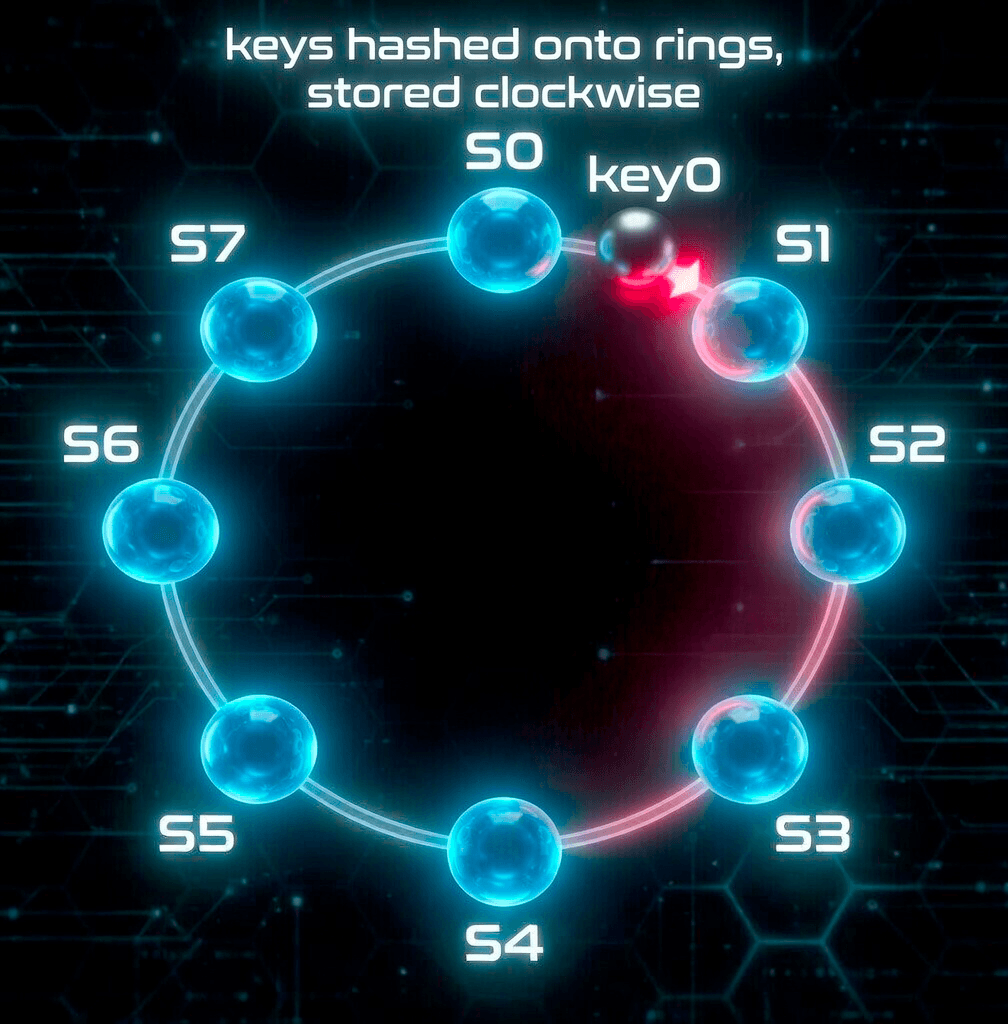
First, all servers are mapped onto a hash ring. In Figure 4, eight servers labeled s0, s1, …, s7 are placed on the hash ring.
Next, a data key is hashed onto the same ring. The key is then stored on the first server encountered when moving clockwise from the key's position. For example, as shown in Figure 4, key0 is stored on server s1.
Advantages of using consistent hashing for data partitioning:
- Automatic scaling: Servers can be added or removed dynamically based on load without requiring manual data redistribution.
- Heterogeneity support: Each server can be assigned a number of virtual nodes proportional to its capacity. For instance, more powerful servers are given more virtual nodes, allowing them to handle a larger share of the data.
Data replication
To achieve high availability and fault tolerance, each piece of data is asynchronously replicated across N servers, where N is a configurable replication factor.
After mapping a key to a position on the consistent hash ring, the system selects the first N servers by walking clockwise from that position. These servers store the replicas of the data. As shown in Figure 5 (with N = 3), the key, key0, is replicated on servers s1, s2, and s3.
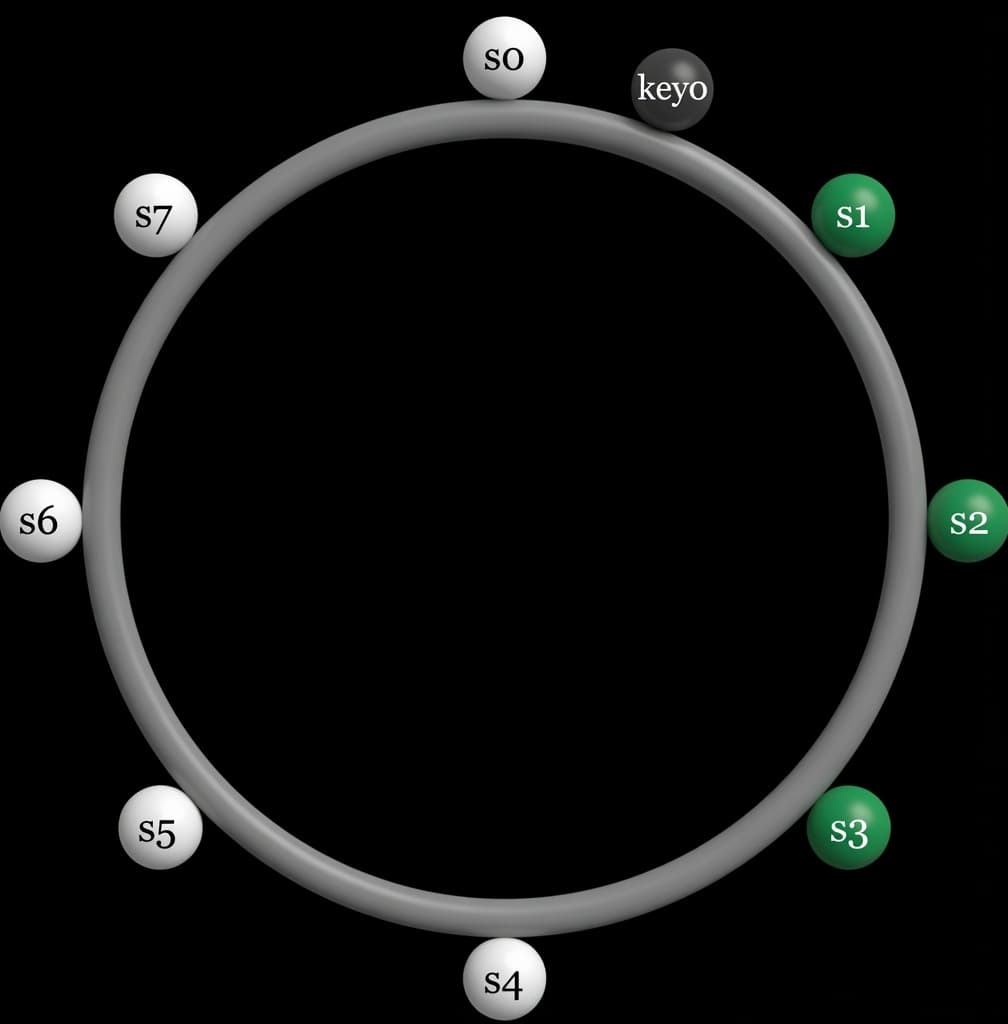
With the introduction of virtual nodes, the first N positions encountered while walking the ring may belong to fewer than N distinct physical servers. To prevent this and maintain the desired replication factor, the system skips duplicate servers and continues walking until it finds N unique physical servers.
To further improve reliability, replicas are placed in different data centers.
Imagine you're saving a vacation photo (key0) on a circular track. To keep it safe, you walk clockwise and hand a copy to the first person you see, s1.
But you don't want to rely on just one person, so you keep walking and give copies to the next two people, s2 and s3 , so your photo is now on three separate phones. If s1 ,s2 , and s3 were all members of the same family living in the same house, you'd skip them and keep walking until you found people in different houses to make sure a single power outage doesn't lose all your copies.
Nodes within the same data center tend to fail together due to shared infrastructure risks such as power outages, network failures, or natural disasters. By spreading replicas across multiple data centers, connected via high-speed links, the system significantly reduces the risk of simultaneous replica loss.
Consistency
In distributed systems, data is copied across multiple nodes (servers). These copies must stay synchronized. Quorum consensus is a common way to ensure consistency for both reads and writes.
Key Terms
- N = Total number of replicas (copies of the data)
- W = Write quorum
→ A write is considered successful only when W replicas acknowledge it. - R = Read quorum
→ A read is considered successful only after receiving responses from at least R replicas.
Example (N=3)
Imagine 3 nodes: s0, s1, and s2.
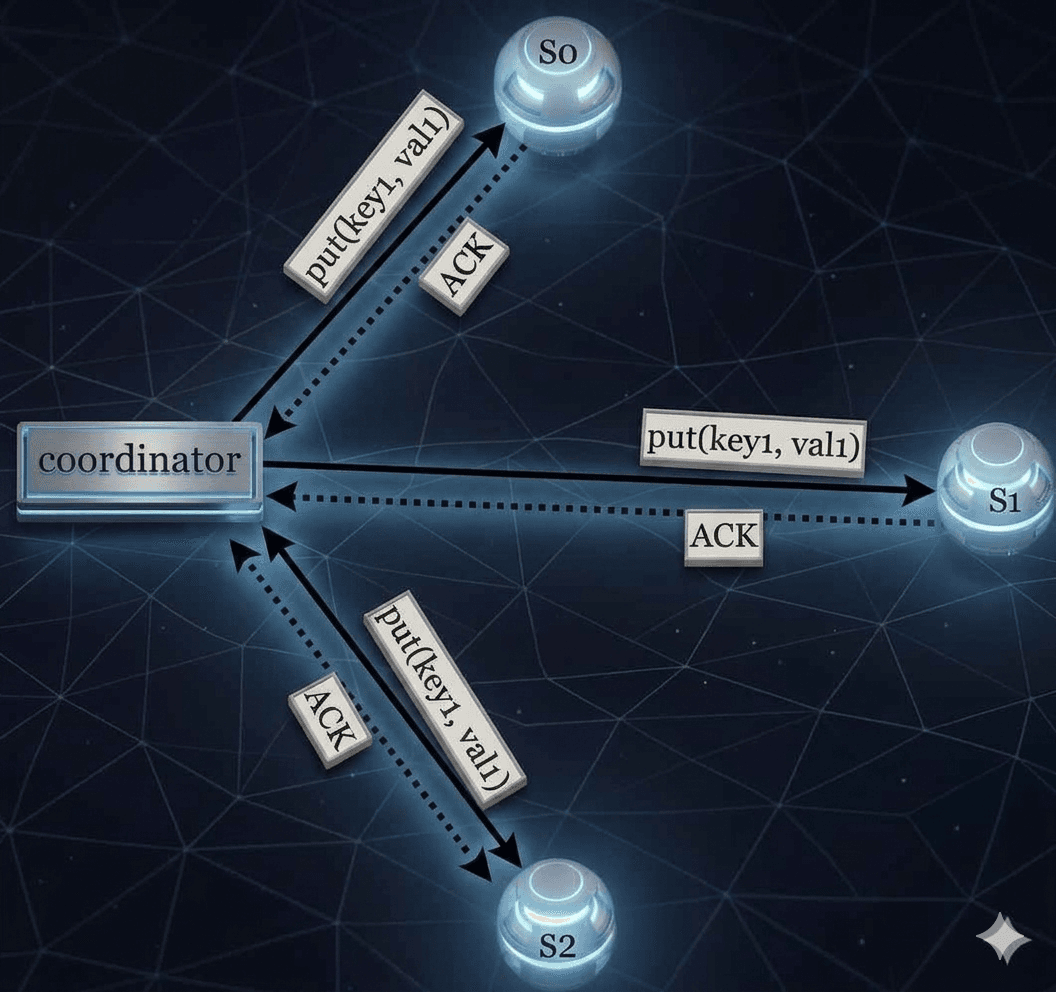
- A coordinator sits between the client and these nodes.
- When writing data, the coordinator sends the data to all three nodes.
- As soon as it gets W acknowledgments (ACKs), it tells the client the write is done.
Important Note:
Even if W = 1, the data is still replicated to all 3 nodes.
W = 1 only means the coordinator doesn't wait for all nodes. It returns success as soon as any one node acknowledges.
Understanding W, R, and N in Distributed Systems
W = 1 does not mean that data is written to only one server.
For example, in the configuration shown in Figure 6, data is replicated across three servers: s0, s1, and s2.
W = 1 simply means the coordinator only needs to receive one acknowledgment from any replica before it considers the write operation successful.
So if the coordinator receives an acknowledgment from s1, it doesn't need to wait for responses from s0 or s2.
--The coordinator acts as a proxy between the client and the storage nodes.
Trade-off Between Latency and Consistency
The values of W (Write), R (Read), and N (Number of replicas) represent a classic trade-off:
- If W = 1 or R = 1, operations are fast because the coordinator only waits for the quickest single response.
--Example: W=1 or R=1: It's like a GPS update that prioritizes showing your location instantly over waiting for every satellite to perfectly sync. - If W or R is greater than 1, the system provides better consistency, but operations become slower because the coordinator must wait for the slowest replica to respond.
--Example: W or R > 1: It's like a flight booking where you wait a few extra seconds to ensure the seat is truly yours before the ticket is issued.
Strong Consistency Rule
Strong consistency is guaranteed when:
-- W(write) + R(read) > N(number of replicas)
This ensures that every read and write operation overlaps on at least one node that has the latest version of the data.
Common Configuration Examples
| Configuration | Meaning | Use Case |
|---|---|---|
| R = 1, W = N | Fast reads (only needs 1 replica for read) | Read-heavy workloads |
| W = 1, R = N | Fast writes (only needs 1 replica for write) | Write-heavy workloads |
| W + R > N (Usually N=3, W=2, R=2) | Strong consistency guaranteed | When data consistency is critical |
| W + R ≤ N | Eventual consistency (no strong guarantee) | When performance is more important than strict consistency |
Tip: Tune N, W, and R based on your application's requirements for speed vs consistency.
Now we have an idea of how to create consistency and the different types of configuration examples.
Consistency Model
Another important factor when designing a key-value store is the consistency model. It defines how consistent the data is across different servers (replicas) and what a client can expect when reading data.
Here are the main types of consistency:
- Strong Consistency: Every read always returns the latest written value. The client neversees old or outdated data.
- Weak Consistency: A read might return an old value. You're not guaranteed to see the latest update right away.
- Eventual Consistency: This is a popular type of weak consistency. If no new updates are made, eventually all servers will have the same latest data. Over time, everything becomes consistent.
Strong consistency is usually achieved by making servers wait and coordinate with each other before allowing new reads or writes. This makes the system very consistent, but it can slow things down or even block operations, which hurts availability.
Our Recommendation:
We recommend using Eventual Consistency for our key-value store (same model used by Dynamo and Cassandra).
With eventual consistency, the system stays highly available and fast. However, when multiple writes happen at the same time, different versions of the data can temporarily exist. In this case, the client is responsible for resolving (reconciling) these conflicts.
The next section explains how we handle these conflicts using versioning.
Inconsistency resolution: versioning
Replication improves availability by keeping multiple copies of data. However, it can cause inconsistencies when replicas get out of sync.
To solve inconsistency problems, systems use versioning and vector clocks.
What is versioning?
Versioning treats every change to a piece of data as a new immutable version. Old versions are not overwritten, they are kept for comparison.
Example of How Inconsistency Happens
- Initially, both replica nodes n1 and n2 have the same value for the key "name".
- Server 1 changes the name to "johnSanFrancisco".
- At the same time, Server 2 changes the name to "johnNewYork".
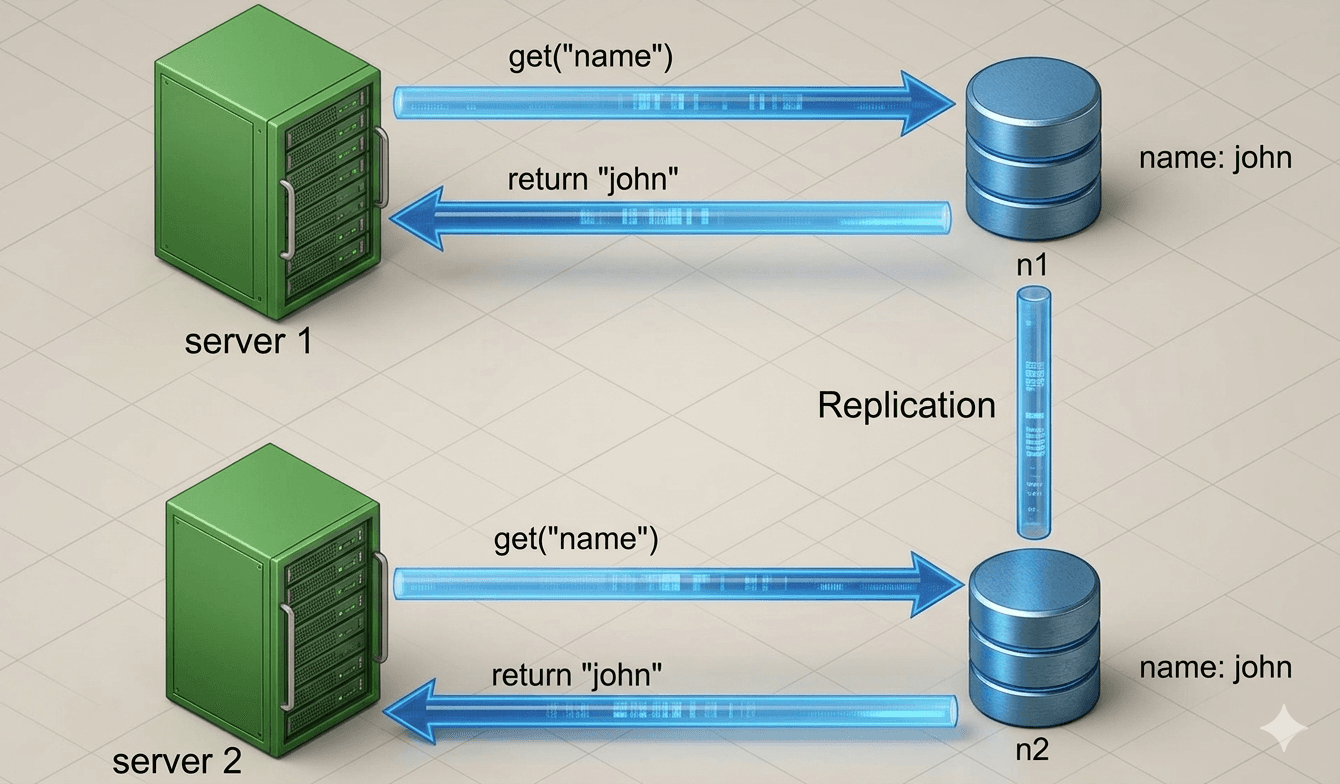
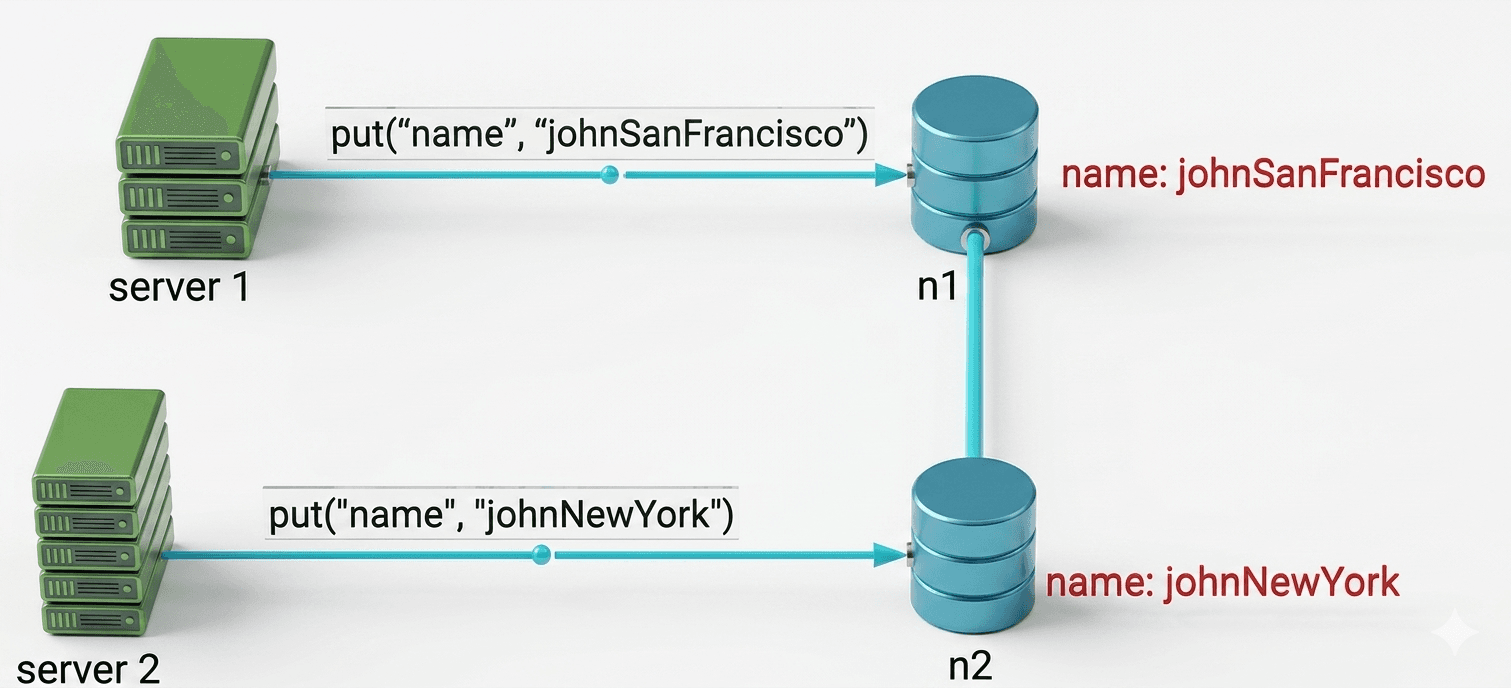
Now there are two conflicting versions (v1 and v2). There is no clear "correct" version, and simply ignoring the original valuedoesn't solve the conflict between the two latest changes.
To detect and resolve such conflicts, we need a versioning system. One popular solution is called a Vector Clock.
How Vector Clocks Work
A vector clock is a list of [server, version] pairs attached to each piece of data. It helps determine whether one version:
- Comes before another (ancestor),
- Comes after another (successor), or
- Conflicts with another (siblings).
A vector clock looks like this: D([S1, v1], [S2, v2], …, [Sn, vn])
Rules for updating a vector clock when data is written to server Si:
- If [Si, vi] already exists → increment vi
- If it doesn't exist → add a new entry [Si, 1]
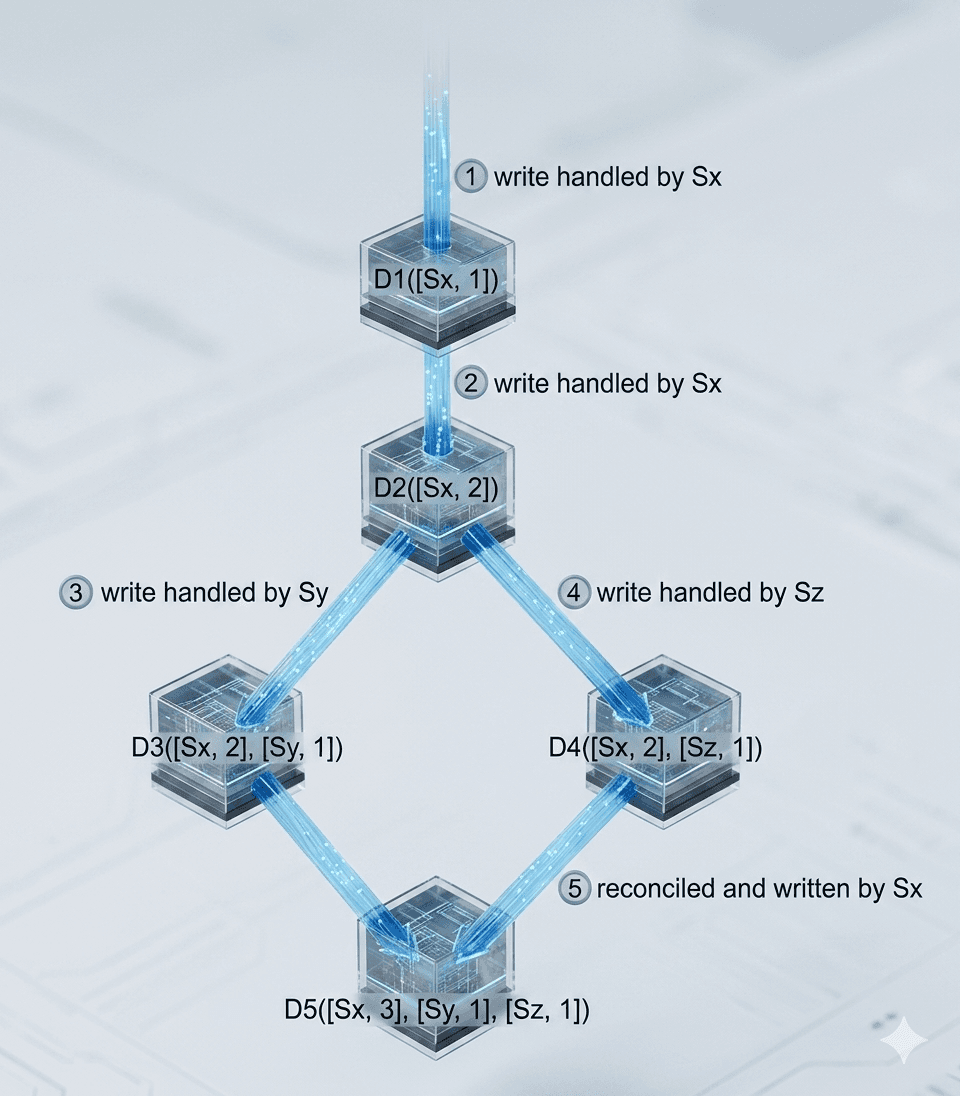
The above abstract logic is explained below with a concrete example as shown here in figure 9.
Example Walkthrough
- A client writes data D1 to server Sx → Vector clock becomes: D1([Sx, 1])
- Another client reads D1, updates it to D2, and writes it back to Sx → D2([Sx, 2])
- A client reads D2, updates it to D3, and writes it to Sy → D3([Sx, 2], [Sy, 1])
- Another client reads D2 (the old version), updates it to D4, and writes it to Sz → D4([Sx, 2], [Sz, 1])
- When a client reads both D3 and D4, it detects a conflict (both versions came from D2 but were modified independently by Sy and Sz). The client resolves the conflict and writes the final version D5 to Sx → D5([Sx, 3], [Sy, 1], [Sz, 1])
Detecting Conflicts with Vector Clocks
- No conflict (ancestor): Version X is an ancestor of Y if every counter in Y is ≥ the corresponding counter in X.
Example: ([s0,1], [s1,1]) is an ancestor of ([s0,1], [s1,2]) - Conflict (siblings): There is a conflict if any counter in one version is smaller than the corresponding counter in the other.
Example: ([s0,1], [s1,2]) conflicts with ([s0,2], [s1,1])
Downsides of Vector Clocks
- Complexity: The client application must implement logic to detect and resolve conflicts.
- Size growth: The list of [server:version] pairs can become very long over time.
Solution to size growth: Set a maximum length for the vector clock. When it gets too long, remove the oldest entries.
This can sometimes make conflict detection less accurate, but according to the Dynamo paper, Amazon hasn't faced major issues with this in production.
Handling Failures
Failures are common in large distributed systems. We need good strategies to detect and handle them.
- Failure Detection
Under Construction
This article is currently being completed. Visit later for updates!
Summary
Thank you for reading!
To continue learning the fundamentals of System Design, make sure to check out the additional blogs here for more deep dives into scalable architecture.
Credit: ByteByteGo - Design a Key-value Store